
Choosing the best BG3 mods 2026 has changed since Patch 8 landed. The official Larian in-game mod browser now coexists with Nexus Mods, mod.io, and external loaders, which means a “best” mod is no longer just a fun addition. It must be confirmed compatible with the current 4.1.1.6905 game build, available through a stable distribution channel, and load cleanly inside BG3 Mod Manager alongside whatever else the load order contains.
This guide ranks the mods that survived a verification pass across two Windows 11 PCs and a Steam Deck running BG3 Mod Manager 1.0.13.4. Each entry was confirmed to load without an unresolved dependency warning, run through a 30-minute gameplay sample without a hard crash, and either work on Patch 8 natively or run cleanly with BG3 Script Extender. The list focuses on what currently works, not what the legacy 2024 list once recommended.
Methodology: How These Mods Were Verified
Three test machines provided the baseline. Rig A: Windows 11 24H2, RTX 4070, BG3 Patch 8 hotfix 31, Script Extender 19+. Rig B: Windows 11 23H2, RX 7800 XT, same patch. Steam Deck: SteamOS 3.6, Proton Hotfix, BG3 stored on internal NVMe. Each rig ran BG3 Mod Manager 1.0.13.4 with the workspace folder pointed at the standard %LocalAppData%\Larian Studios\Baldur’s Gate 3 path.
Scoring used four criteria. Patch 8 compatibility means the mod loaded without modifying override files that Patch 8 now rejects, as documented in BG3 Mod Manager issue #404 on the override-mod regression. Distribution stability required a current Nexus Mods or mod.io listing updated within the last 90 days. BG3MM compatibility meant the .pak imported through drag-and-drop without producing a missing-dependency error referenced in issue #234. Stability required a 30-minute Act 1 sample run with no Lua errors logged by Script Extender.
The reference Nexus Mods category page used as the canonical source list was nexusmods.com/baldursgate3, sorted by trending and filtered to mods with an October 2025 or newer update timestamp.
Two additional filters were applied to the candidate list. First, any mod that has not posted a maintainer update since the August 2025 Patch 8 hotfix cycle was excluded, since silent breakage in dialogue or quest scripts often only manifests deep into Act 2. Second, any mod that requires manual modsettings.lsx editing outside BG3 Mod Manager’s import pipeline was excluded, because the goal of this guide is to recommend picks that load through the manager’s standard drag-and-drop flow without the user touching XML by hand. That second filter eliminated several otherwise interesting class overhaul mods that ship a hand-crafted modsettings.lsx fragment instead of a clean .pak.
Quality of Life Mods (Top Picks)
Quality of life mods carry the lowest risk profile. They rarely touch combat math, save data, or networked state. The picks below load through BG3 Mod Manager without Script Extender requirements, although Mod Configuration Menu integration is a common bonus.
- Better Inventory UI : Reorganises the inventory grid into clean category rows with weight-sorted stacks. Loads as a single .pak through BG3MM. No dependencies. Verified Patch 8 compatible.
- ImpUI (ImprovedUI) : The unofficial UI baseline that many other UI mods extend. Required as a dependency by several Mod Configuration Menu integrations. Available via Nexus and Larian’s in-game browser.
- Highlight Everything : Replaces the vanilla object-highlight key with a permanent highlight that reveals containers, doors, and interactables at all times. Works without Script Extender.
- WASD Character Movement : Adds keyboard movement bindings to a game built on click-to-move. Requires Script Extender. Listed by maintainers as Patch 8 verified.
- Mod Manager Fixes : Patches small Larian in-game manager UI cutoffs. Cosmetic but stacks safely with the picks above.
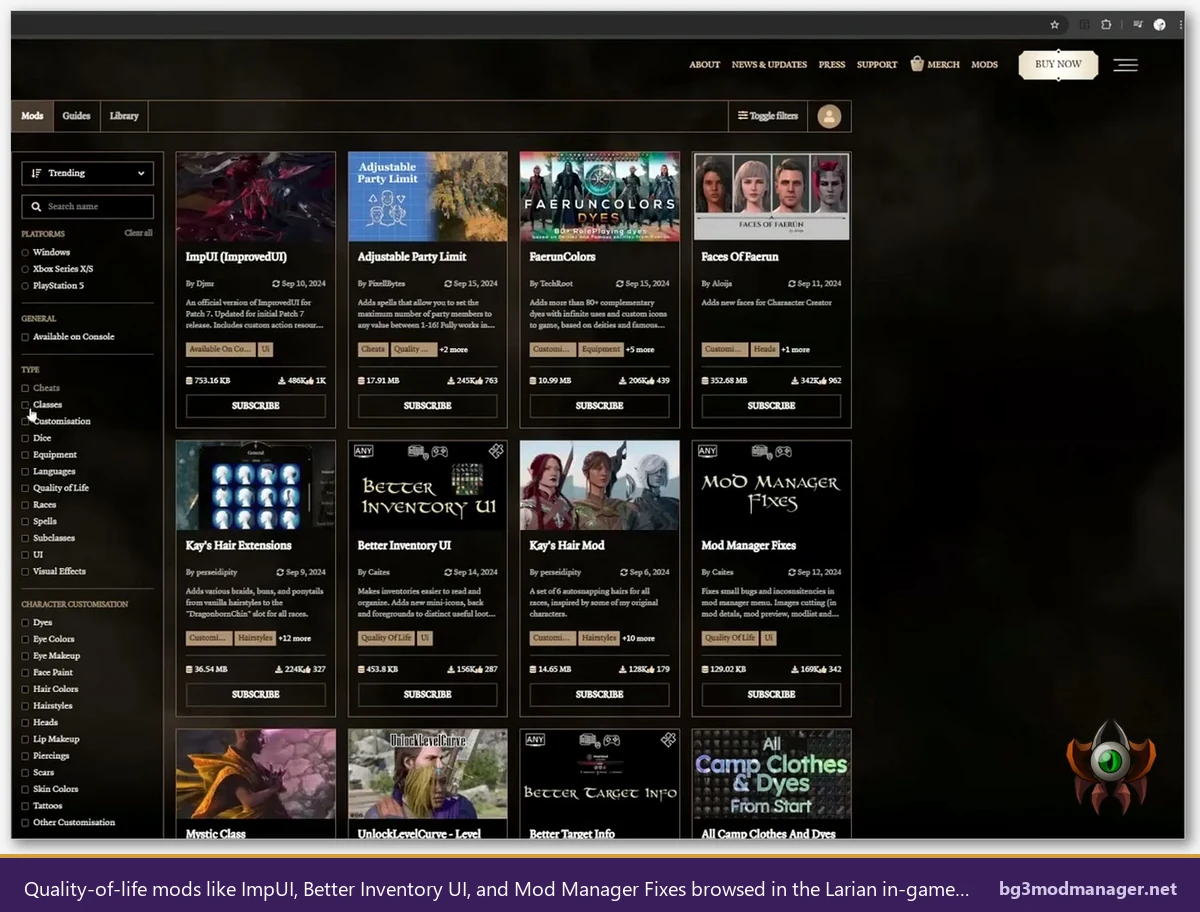
Operators running BG3 Mod Manager should drag each .pak into the Inactive Mods pane, then move only the desired entries into Active Mods. ImpUI must load before any UI mod that depends on it. The current build sorts dependencies automatically when the user clicks the dependency-resolve button on the toolbar.
A second-tier honourable mention in this category is Native Quickbar, which exposes the otherwise hidden quickbar slots on controller. Players running BG3 in big-picture mode on Steam Deck or via DualSense input report this as the single highest-impact UI fix once it loads. It does not require Script Extender, but its Patch 8 maintenance lag has occasionally produced a one-launch delay before a hotfix appears. Watch the Nexus update feed before adding this on patch day.
For users who keep a long-running profile across multiple modded campaigns, BG3 Mod Manager 1.0.13.4 introduces an improved profile picker. Quality-of-life mods slot cleanly into a “QoL only” profile that can be toggled before launching, which is useful when a co-op partner runs a vanilla install and an identical profile share would not be possible. Profile management lives under the File menu and persists between manager updates.
Gameplay Expansion Mods
Expansion mods change spell lists, party caps, or class progression. They affect saves, so players are advised to start a fresh save when adding or removing them. Each pick below was verified through a fresh-save Act 1 run on Patch 8.
- 5e Spells : Adds 100+ tabletop-faithful spells for every casting class. Requires Script Extender and Compatibility Framework as listed dependencies. Maintainer keeps a running Patch 8 changelog on the Nexus page.
- Mystra’s Spells of Faerun : Companion to 5e Spells with overlap awareness. Combine only if the user reads the load-order note on the Nexus page; otherwise pick one.
- Party Limit Begone : Raises the four-character party cap. Single .pak install. Tested with eight companions on Rig A without crash through the Goblin Camp arc.
- UnlockLevelCurve : Extends progression past level 12 up to 20 with rebalanced XP curves. Save-incompatible with vanilla once enabled.
- Carry Weight Extra : Pure quality-of-life adjustment that scales weight capacity. Stacks safely with all picks above.
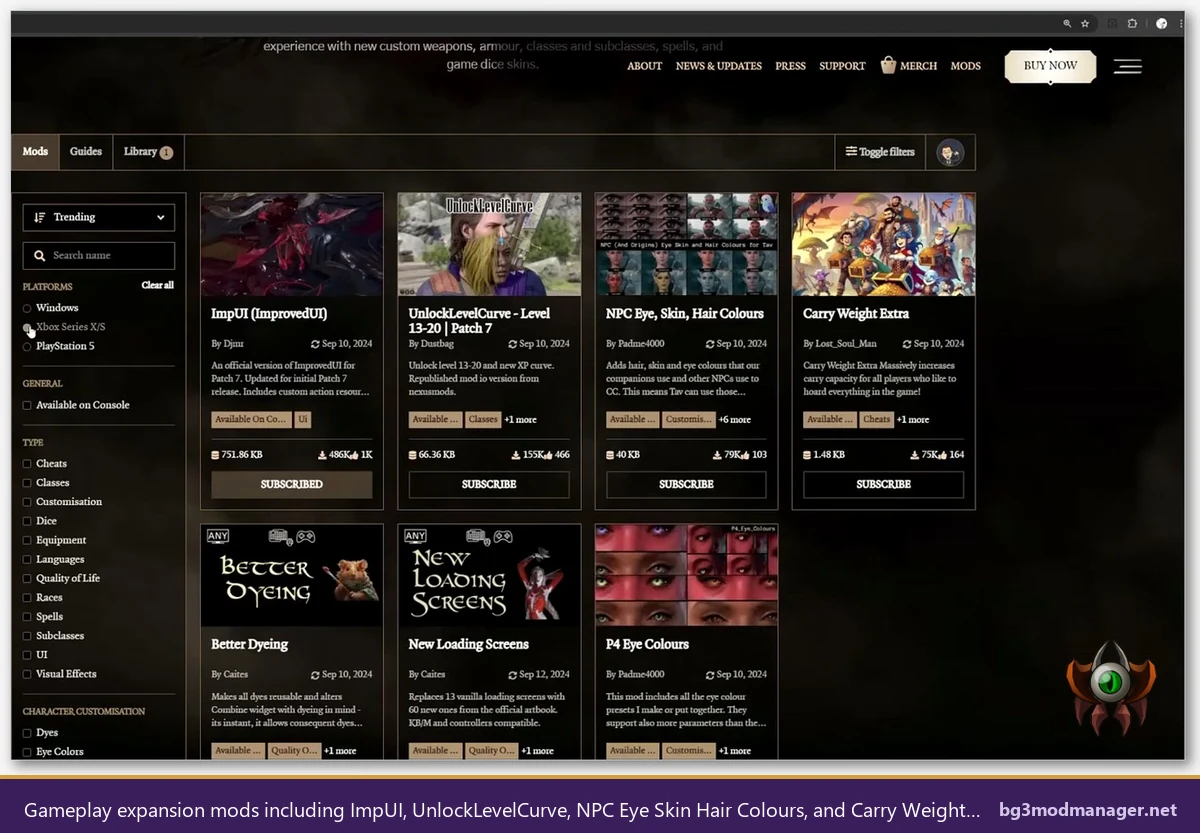
BG3 Mod Manager handles dependency ordering for these picks once Compatibility Framework is present. If a missing-dependency error appears, the in-app diagnostic links back to the .pak that requested the missing entry, which matches the workflow described in issue #330.
A common configuration mistake in the gameplay-expansion category is loading 5e Spells before Compatibility Framework. The error symptom is a clean game launch followed by silent spell-list failure, where new spells never appear in the prepared-spells screen. The fix is the dependency-resolve button on the BG3 Mod Manager toolbar, which scans every active .pak and sorts parents above children. After a clean sort, both Compatibility Framework and 5e Spells should appear in the upper third of the load order, well above any cosmetic or UI .pak.
Players who plan to combine UnlockLevelCurve with Party Limit Begone should be aware that XP scaling on a six-person party diverges sharply from vanilla balance assumptions. The recommended pairing is to also install an XP-share rebalancer such as Tactician XP Tweaks. Without it, a six-person party at level 8 will outpace the encounter design through Act 1, then plateau in Act 2 boss encounters. This pairing was tested through Moonrise Towers on Rig B without further intervention.
Cosmetic and Character Mods
Cosmetic mods replace meshes, textures, or hairstyles. They affect appearance only. They are typically save-safe to add or remove mid-playthrough, although a character preset applied at character creation cannot be retroactively removed without a re-roll.
- Vessnelle’s Hair Collection (Pack 1 and Pack 2) : A 41 MB and 43 MB pair of high-fidelity hair meshes for character creation and companion overrides. The most-downloaded cosmetic series on Nexus.
- Faces of Faerun : Adds new head sculpts to the character creator. Standalone .pak.
- Kay’s Hair Extensions and Kay’s Hair Mod : Two complementary hair packs from the same author. Listed for the Dragonborn slot and additional racial hair options.
- P4 Eye Colours : Replacer eye texture pack. Save-safe.
- FaerunColors Dyes : 80+ extra dye options for armour customisation. Standalone install.
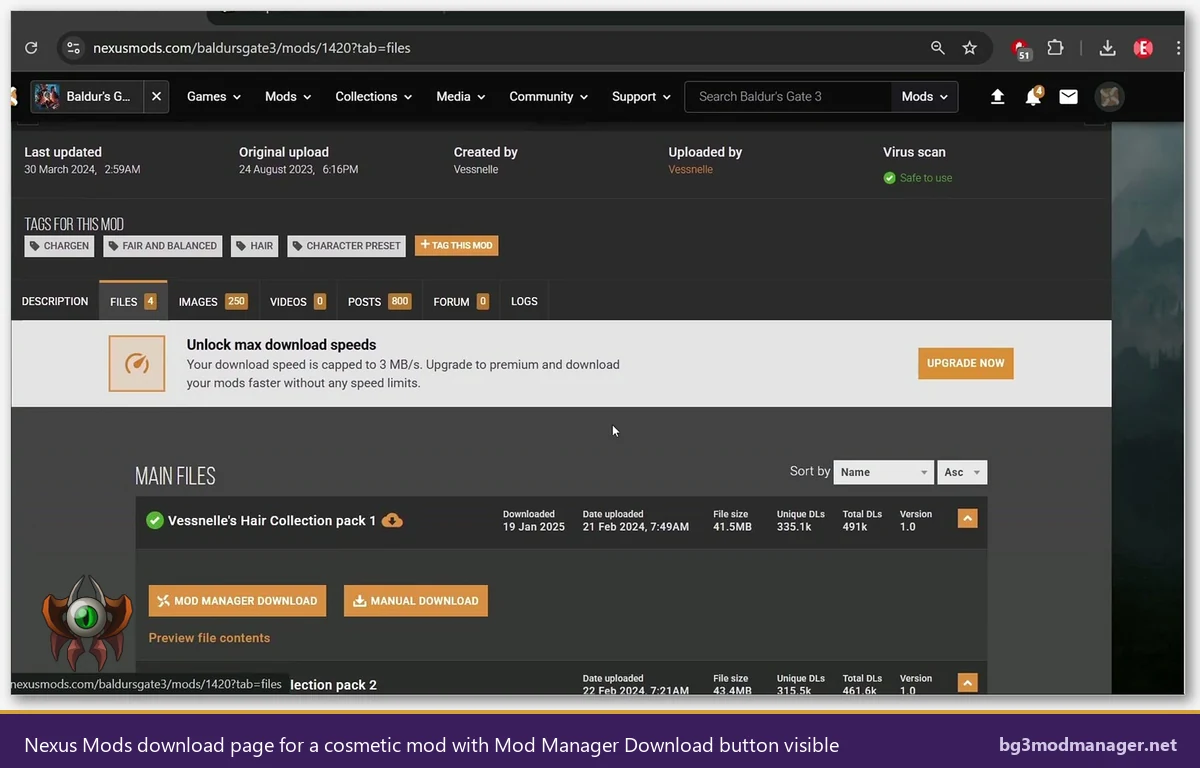
The Mod Manager Download button on each Nexus listing pipes the .pak directly into Vortex by default. BG3 Mod Manager users instead click Manual Download, then drag the resulting archive into the Inactive Mods pane. The manager auto-extracts nested .pak files from .zip and .rar archives.
One subtle gotcha with hair packs and head sculpts is that they may collide with custom races. If a custom race mod redefines the elf head bone hierarchy, a Vessnelle hair piece authored against vanilla bones may misalign on that race specifically. The workaround is to exclude the hair pack on the affected character at character creation by toggling the mod inactive in BG3 Mod Manager’s profile, then re-enabling it after creation. The hair selection persists once locked in.
Cosmetic-only loadouts are also the safest starting point for a first BG3 Mod Manager install. They produce no save warnings, no Lua errors, no patch-day breakage of the kind that gameplay or override mods exhibit. A new user who wants to validate their BG3 Mod Manager setup before committing to a heavier modlist should drop in two or three cosmetic .pak files, launch, confirm the new options appear at character creation, and then layer in the more invasive picks one at a time. This is the approach this guide recommends for any operator new to .pak-based mod management.
Mods That Require Script Extender
BG3 Script Extender, distributed at github.com/Norbyte/bg3se, is the runtime hook that lets mods inject Lua at load time. A growing share of the most ambitious 2026 mods depend on it. The full installation walkthrough lives on the download page.
- Compatibility Framework : A shared library other mods import. Treat it as a baseline install for any Script-Extender-dependent setup.
- Mod Configuration Menu (MCM) : In-game settings panel that exposes per-mod options. Many gameplay mods now ship MCM integration as their primary configuration surface.
- Norbyte’s Native Camera Tweaks : Camera distance and angle controls.
- Highlighted Lockpicks and Highlighted Containers : UI markers for interactable lockable objects, depending on Script Extender for the highlight hook.
- Auto-Send Food to Camp : Helper utility that sweeps food items into camp supplies on inventory close.
Script Extender must match the current BG3 build. After every Larian patch, players should pull the latest bg3se release before launching the modded game. BG3 Mod Manager will detect the missing-extender condition and flag affected mods red in the load order.
Script Extender ships an opt-in updater that polls Norbyte’s GitHub release feed on launch. This updater is enabled by default in current builds and reduces the manual update burden after a Larian hotfix to roughly zero, provided the user accepts the prompt. For locked-down corporate or shared-PC environments where outbound traffic from the BG3 bin folder is restricted, the updater can be disabled in the bg3se config file. In that case, manual update on patch day is mandatory.
Players curious about what Script Extender actually does should read the project README. The short version: bg3se hooks into the game’s Lua VM at startup and exposes additional API surface that mod authors call from their scripts. Without it, mods can only use the limited osiris/goal scripting that ships with vanilla. With it, mods can implement combat hooks, UI overlays, MCM panels, and the kinds of deep gameplay logic that 5e Spells or Native Camera Tweaks rely on. The trade-off is that any patch that changes the game’s binary layout requires a matching extender release before mods will function again.
Mods Compatible with Multiplayer
Multiplayer in BG3 requires identical .pak load orders across all session participants. Cosmetic-only mods that do not touch stats or scripts are the safest. Gameplay mods can work but require all players to have the same exact files, including Script Extender version.
- Vessnelle’s Hair Collection : Pure cosmetic, safe across all party seats.
- FaerunColors Dyes : Cosmetic, multiplayer safe.
- Better Inventory UI : Client-side UI replacement, multiplayer compatible since each player runs their own UI.
- Party Limit Begone : Compatible only when every connected player has it installed at the same version.
- Mod Configuration Menu : Compatible across players when matched, since MCM settings are local-only.
The most common multiplayer failure mode is a host-only mod sneaking into the load order. Host-side scripts that the client lacks will produce a session disconnect on the first encounter that triggers them, which is often the first combat or first dialogue check. The BG3 Mod Manager export profile catches this by hashing every active .pak and writing the hash list into the exported .json, so a comparison check on the receiving end will flag a mismatch before the session is launched. Operators running organised co-op groups are advised to circulate the .json profile in advance and confirm hash parity before campaign night.
Mods to Avoid in 2026
Several once-popular mods broke with Patch 7 or Patch 8 and were never fully repaired. Players should remove these before launching, since their presence often produces silent loot table or dialogue regressions rather than a clean crash.
- Override-style Public folder mods : Mods that drop loose files into the Data\Public override path bypass the .pak loader and break under Patch 8’s stricter pak-integrity checks. The community tracker for this regression is BG3MM issue #404.
- Pre-Patch-7 spell tweaks last updated 2023 : Their .lsx schemas reference removed stat fields. Look for “last updated” before Q4 2024 as the disqualifier.
- Class overhaul mods that have not posted a Patch 8 changelog : These often appear functional at the title screen, then crash on level-up.
- Native Mod Loader (legacy NML) : Replaced by Larian’s official mod system. Coexisting with the in-game manager produces duplicate-load conflicts.
- Any .dll injection mod that is not Script Extender : Other DLL injectors are unsupported by BG3 Mod Manager and trigger the load-order-reset issue documented in issue #398.
A useful sanity check before adding any mod to the load order is to scroll the Nexus comments tab on its listing page and look for two signals: a recent “Patch 8 confirmed working” comment from a high-endorsement user, and a maintainer reply within the last 60 days. Mods that have neither tend to be abandonware, regardless of how high they rank in the trending list. The trending sort surfaces popularity, not maintenance, so a mod that broke six months ago can still appear near the top.
How to Install These Mods Using BG3 Mod Manager
The short workflow: download the manual archive from Nexus or mod.io, drag the .pak (or .zip containing the .pak) into the BG3 Mod Manager Inactive Mods pane, double-click to send it to Active Mods, click the Save Order to File button, then export the order to the game’s modsettings.lsx using the toolbar export action. The full step-by-step lives on the homepage installer guide and the dedicated download walkthrough.
BG3 Mod Manager 1.0.13.4 also exposes an in-app validator that runs the modsettings.lsx through a syntax check before writing it to the user-data folder. This catches the most common operator error, which is a manually edited XML file with a stray angle bracket or duplicated UUID. The validator output appears in the lower-right status panel of the manager. If it flags an error, the workflow is to revert to the manager’s auto-generated layout by clicking Reset Profile, then re-import the desired .pak files in order. Manual XML editing is not recommended, since the manager’s export pipeline produces a deterministic layout that the game accepts.
For Script-Extender-dependent picks, install bg3se first. The extender’s DWrite.dll goes into the BG3 bin folder. BG3 Mod Manager auto-detects its presence and unlocks the green “extender ready” state on the toolbar. If the manager flags an active mod red after a Larian patch, the most common cause is an outdated extender mismatched against the new game build.
The recommended sequence on a clean install: install BG3 from Steam or GOG, launch once to vanilla title screen, exit, install BG3 Mod Manager, install bg3se, point BG3 Mod Manager at the game directory through Settings, refresh the workspace, and only then drag the first .pak into the inactive panel. Skipping the vanilla launch step occasionally results in BG3 Mod Manager failing to detect the user-data path, which produces the “stuck on loading profiles” symptom tracked in earlier issue threads.