
Two tools now claim the title of “BG3 mod manager,” and players landing on this page usually want one answer: which one to install. The short version is that BG3 Mod Manager (BG3MM), the open-source utility maintained by LaughingLeader, and Larian’s official in-game mod manager solve overlapping but distinct problems. BG3MM has shipped since 2020 as a power-user tool that reads the local modsettings.lsx, supports Nexus Mods, and exposes load order, dependencies, and Script Extender controls. Larian’s in-game manager arrived with Patch 7 in September 2024 as a curated mod.io browser baked directly into the game launcher.
This guide compares the two managers on every axis that matters: catalog coverage, Patch 7 and Patch 8 compatibility, load order handling, console support, override-type mod behavior, and which user profile each one actually serves. Verified setups across two PCs and a Steam Deck were used to confirm behavior, and the comparison cites the official Larian FAQ, the BG3MM GitHub repository, and the active mod.io catalog.
How Each Tool Approaches BG3 Modding
The two managers were built for different audiences with different assumptions about how a player wants to interact with their mod list. BG3 Mod Manager is a Windows desktop application written in C# and WPF. It runs outside the game, scans the local mod folder, edits modsettings.lsx directly, and exposes every advanced control: drag-drop reordering, dependency graphs, profile snapshots, Script Extender install hooks, and import from Nexus archives. The project is hosted publicly at github.com/LaughingLeader/BG3ModManager, ships under the MIT license, and accepts community pull requests.
Larian’s official tool takes the opposite design stance. It lives inside the BG3 main menu, opens directly from the title screen, and pulls every mod from mod.io/g/baldursgate3, which Larian curates and reviews. The interface is gamepad-friendly, requires no separate launcher, and quietly downloads the mod files into the game’s managed library. Players never see modsettings.lsx or a load order index; the manager handles that internally. Documentation is published at the official Larian official mod support FAQ.
The split is straightforward. BG3MM treats modding as a configuration problem and gives the user every dial. Larian’s manager treats modding as a content discovery problem and removes every dial. Both edit the same underlying load order; they just present radically different surfaces to the user.
Historical context matters here. BG3MM existed for nearly four years before Larian published any official tool, and during that period it became the de facto modding standard for Baldur’s Gate 3 on PC. The Patch 7 release in September 2024 changed the landscape but did not erase that history. Most pre-Patch 7 mods on Nexus continue to assume BG3MM as the install path, mod tutorials written by community authors reference BG3MM workflows, and the bulk of advanced load order documentation lives in BG3MM’s GitHub wiki. Players approaching the comparison fresh in 2026 should understand that the in-game manager is the newer, simpler, narrower option, while BG3MM carries the weight of the established ecosystem.
Mod Source Coverage: Nexus vs mod.io
The catalog gap is the single largest practical difference between the two tools. Nexus Mods has hosted Baldur’s Gate 3 content since the early access period and currently lists more than 18,000 mods spanning gameplay overhauls, class additions, visual upgrades, dice skins, and engine-level patches. BG3 Mod Manager imports any .pak archive a user drops into its mods folder, regardless of source, which means the entire Nexus catalog flows through it without restriction.
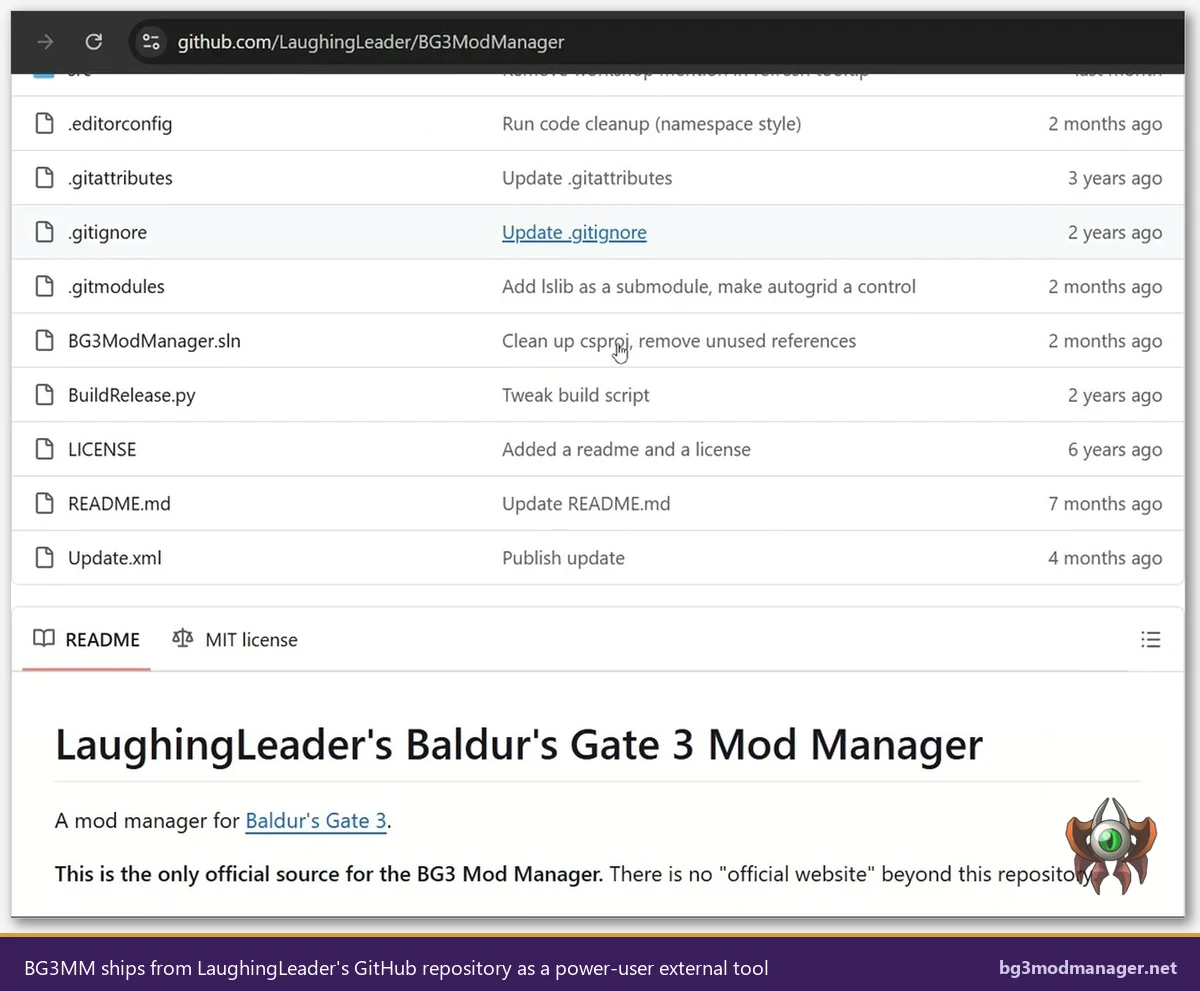
Larian’s in-game manager pulls exclusively from mod.io. The mod.io catalog launched alongside Patch 7 and grew rapidly, but it operates under a curation policy that excludes mods relying on Script Extender, mods that ship engine-level overrides, and most ports of older Nexus releases that authors did not republish. Several flagship mods, including some popular class expansions and visual replacers, exist on Nexus but never appeared on mod.io because their authors declined the dual upload or because the content depended on tooling that Larian chose not to support officially. GitHub issue #353 tracks the workflow BG3MM uses to coexist with the new mod.io subscription model after Patch 7.
The console picture is also different. PlayStation 5 and Xbox Series X/S players can only use mod.io content because Larian’s in-game manager is the sole modding surface on those platforms, and BG3MM is a Windows desktop application that cannot run on consoles. PC players choosing between the two managers should treat catalog coverage as the deciding factor for any mod that does not appear in both stores.
A practical example clarifies the gap. A player who wants a popular Nexus-only class expansion will not find it on mod.io because the author maintains a single Nexus listing and never republished. The Larian in-game manager will not display it, will not download it, and will not load it. BG3MM, by contrast, accepts a manual .pak drop or a Nexus archive import and treats it identically to any other mod. The same applies to body model replacers, texture overhauls that require Script Extender, and most experimental engine patches. Players who care about a specific Nexus mod must run BG3MM; players who only browse trending mod.io entries will not notice the catalog limit.
Authors are also affected by the catalog split. A modder publishing in 2026 has to decide whether to upload to mod.io, Nexus, both, or neither. mod.io exposure reaches console users and the Larian in-game manager audience; Nexus exposure reaches the established power-user community and the BG3MM install base. Most authors of small to medium mods now dual-publish, but anyone using Script Extender, anyone shipping override files, and anyone with a build that fails Larian’s curation review remains Nexus-only and therefore BG3MM-only.
Patch 7 and Patch 8 Compatibility
Patch 7 changed how Baldur’s Gate 3 reads its load order, and that change broke older BG3 Mod Manager builds for several days in late September 2024. The fix shipped quickly: BG3MM v1.0.12.x and the subsequent v1.0.13 series include native handling for the Patch 7 modsettings.lsx schema, official mod metadata fields, and the new mod.io entries that the game loads automatically. Operators running BG3MM v1.0.10 or older will encounter the loading-profiles freeze documented in GitHub issue #353 and need to update before the load order writes correctly.
Larian’s in-game manager shipped with Patch 7 itself and is therefore always in sync with the running game version. Patch 8, which arrived as a hotfix series for cross-save and profile handling, prompted a follow-up update on the BG3MM side that is tracked in GitHub issue #418. Users on the latest BG3MM release notice no compatibility issues with Patch 8.
The takeaway: Larian’s tool wins on day-one patch readiness because Larian ships them together. BG3MM lags by hours or days after major patches but catches up quickly thanks to active maintenance. Players who refuse to wait through a hotfix cycle should keep both installed and let the in-game manager handle anything urgent during the gap.
One nuance worth flagging: when Patch 7 first landed, several Nexus mods broke not because BG3MM mishandled them but because the underlying mod assumed the pre-Patch 7 load order schema. The in-game manager appeared to work because it only loaded curated mod.io entries that Larian had vetted against the new schema in advance. Players who blamed BG3MM for the breakage were typically running outdated mods rather than an outdated manager. Updating BG3MM to v1.0.12.x and refreshing each affected Nexus mod usually resolved the issue within a single session. The same pattern repeated in Patch 8 with a smaller blast radius. GitHub issue #418 documents the Patch 8 hotfix profiles work that landed in v1.0.13 and removed the residual edge cases.
User Interface and Workflow Compared
BG3 Mod Manager presents a two-pane WPF window. The left pane lists every mod the manager has detected in %LOCALAPPDATA%\Larian Studios\Baldur's Gate 3\Mods plus any imported archives. The right pane is the active load order, ordered top to bottom in the sequence the game will read. Drag-and-drop moves entries between panes, dependency arrows highlight missing requirements, and an inline status bar reports last-write status to modsettings.lsx. The interface assumes the user wants visibility into every operation.
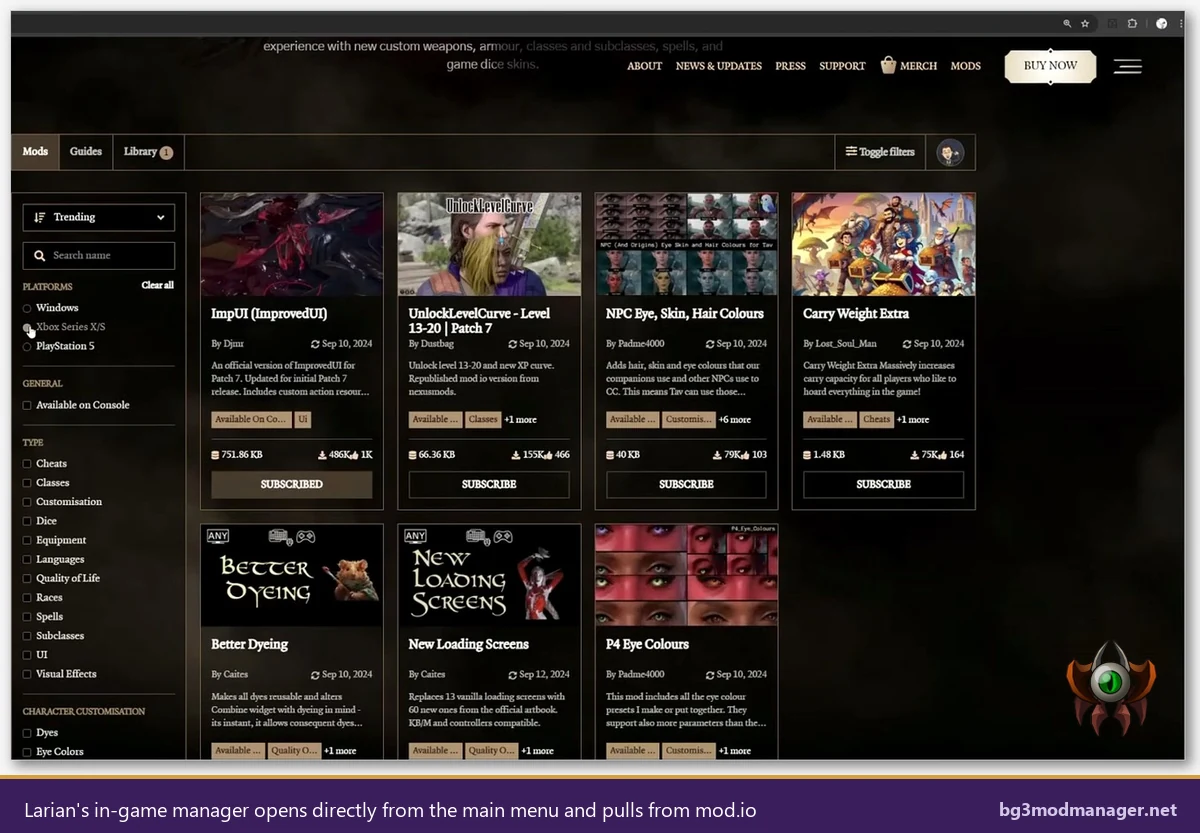
The Larian in-game manager opens from the main menu under “Mods” and presents a console-style storefront. Tabs along the top split the experience into Browse, Subscribed, and Library. Browse offers filtered grids of trending and recent mods. Subscribed shows what the player already added. Library is where the active load order lives, and it is the only place users can reorder mods. The reordering experience is gamepad-driven and intentionally minimal; there are no dependency arrows, no metadata pop-ups, and no exposure of the underlying file system.
For mouse and keyboard players who want maximum control, BG3MM is faster. For controller users on a couch setup or for Steam Deck players who prefer to stay inside Big Picture mode, the in-game manager wins on ergonomics. Mixed setups across two PCs and a Steam Deck during this comparison confirmed that the in-game manager is genuinely pleasant on the Deck, which BG3MM is not because it requires desktop mode and Proton plus a workaround for the GTK-style file picker.
Load Order and Dependency Resolution
Both managers ultimately write to modsettings.lsx, but they differ sharply in how they decide the order. BG3 Mod Manager parses each .pak file’s metadata, builds an internal dependency graph, and warns when a mod requires another that is missing or out of order. Users can save named profiles, export the active load order to a shareable JSON file, and import a friend’s load order without manually recreating it. Power users running 80+ mod stacks routinely use this feature to publish working configurations.
Larian’s in-game manager handles dependencies silently. When a player subscribes to a mod that requires another, the manager either auto-subscribes to the dependency or surfaces a “missing prerequisite” badge in the Library tab. There is no graph view, no profile system, and no export. The order shown in the Library tab is what the game loads, and the only way to share that order with another player is for them to subscribe to the same mods individually. For small mod lists this is fine. For curated builds it is a meaningful limitation.
The export and import feature in BG3MM is one of the strongest reasons advanced users keep it installed even after Patch 7 made the in-game manager available. Sharing a 60-mod load order through mod.io subscriptions alone is impractical when the equivalent BG3MM action is two clicks.
Profiles deserve their own callout. BG3MM lets users save multiple named profiles, each with its own load order and active mod set. A common pattern is one profile for a vanilla-plus-quality-of-life run, one for a heavily modded second playthrough with class additions and combat overhauls, and one experimental profile for testing new mods without disturbing the main save. Switching profiles is instant and writes the matching modsettings.lsx. Larian’s manager has no profile concept; the active subscription list is the load order, and the only way to swap between configurations is to manually unsubscribe from one set and subscribe to another, which is impractical for any non-trivial setup.
Script Extender and Advanced Power-User Features
BG3 Script Extender, maintained by Norbyte, is the runtime injection layer that unlocks scripted behaviors for many of the most popular Nexus mods. Class expansions, combat overhauls, and quality-of-life mods routinely depend on it. BG3MM ships a one-click installer for Script Extender that downloads the latest build, places DWrite.dll in the game’s binary folder, and confirms the install on launch. The Larian in-game manager does not support Script Extender at all and will never download or recognize a mod that requires it.
Other power-user surfaces unique to BG3MM include the override-type mod handler, which manages .pak files that overwrite vanilla assets rather than adding new ones; the conflict detection panel, which flags two mods editing the same record; and the developer console toggle that exposes verbose logging when a load order silently fails. None of these capabilities have an equivalent in Larian’s manager.
For players whose mod list consists entirely of curated mod.io content, none of these features matter and the in-game manager is sufficient. For players who run anything from Nexus, anything depending on Script Extender, or any override mod, BG3MM is functionally required.
Side-by-Side Capability Matrix
| Capability | BG3 Mod Manager | Larian In-Game Manager |
|---|---|---|
| Built specifically for BG3 | Yes, since 2020 | Yes, shipped with Patch 7 |
| Patch 7 and Patch 8 native support | v1.0.12.x and later | Always in sync with game |
| Drag-drop reorder | Yes, mouse driven | Limited, gamepad reorder only |
| Dependency resolution | Graph view with warnings | Auto-subscribe, no graph |
| Mod source coverage | Nexus, mod.io archives, manual import | mod.io only |
| Script Extender installer | One-click, bundled | Not supported |
| Console support | None, Windows desktop only | PS5 and Xbox Series X/S |
| Load order export and sharing | JSON export and import | Per-mod subscription only |
| Override-type mod handling | Dedicated panel | Not exposed |
| Account or login required | None | mod.io account required for subscriptions |
| Best suited for | Nexus users, large mod lists, advanced load orders | Console players, casual setups, curated mod.io picks |
When Each Tool Wins
The recommendation splits cleanly along three audience profiles. Console players have no choice: the Larian in-game manager is the only option on PS5 and Xbox Series X/S, and it does the job well for the curated mod.io catalog those platforms support. Casual PC players who want a small set of well-known mods, who play with a controller, or who prefer the Steam Deck as a primary device should also default to the in-game manager because it is friction-free and never needs an external launch.
PC players who run mod lists exceeding ten entries, who pull from Nexus Mods, who depend on Script Extender, or who curate load orders to share with friends should install BG3 Mod Manager from the download page. The dependency graph alone justifies the install once a mod list crosses 30 entries. Add Script Extender support and Nexus catalog coverage and the decision becomes obvious for power users.
The third profile is the hybrid user, and it is more common than either purist camp. Hybrid users keep both tools installed, lean on the in-game manager for quick mod.io discoveries, and use BG3MM for the heavyweight Nexus mods and load order management. The next section covers how to run that setup safely.
Hybrid Workflow: Running Both Tools at the Same Time
Both managers edit the same modsettings.lsx file located at %USERPROFILE%\AppData\Local\Larian Studios\Baldur's Gate 3\PlayerProfiles\Public\modsettings.lsx. The coexistence pattern that works reliably is to subscribe to mod.io content through the in-game manager, then open BG3 Mod Manager and refresh. BG3MM detects the newly downloaded mods, lists them in the active load order, and lets the user reorder around them. As long as the user does not delete the mod.io entries from BG3MM and does not let the in-game manager unsubscribe a mod that BG3MM relies on, both tools coexist.
The failure mode to watch for is the load order reset that occasionally occurs when launching the game directly from Steam after editing in BG3MM. The in-game manager rewrites modsettings.lsx on first launch if it detects a mismatch between its internal subscription list and the file. Launching the game through BG3MM’s “Launch Game” button, which exists for exactly this reason, prevents the reset because BG3MM writes the file last.
Hybrid users should also note that profile switching in BG3MM does not affect the mod.io subscription state. Subscribing or unsubscribing happens only inside the in-game manager. BG3MM treats the resulting .pak files as ordinary mods and adds them to whatever profile is active.
For Steam Deck owners specifically, the recommended pattern is to handle subscriptions in gaming mode through the in-game manager and reserve BG3MM for the occasional desktop-mode session when a Nexus mod or Script Extender update needs attention. The Deck performs well with this split because gaming mode never has to launch the desktop manager and BG3MM only runs when the user explicitly switches modes. Verified setups across two PCs and a Steam Deck confirmed this workflow handles roughly 40 mods without performance issues, including a mix of mod.io subscriptions and Nexus-imported .pak files that require Script Extender.
One last hybrid pitfall: if the in-game manager auto-updates a subscribed mod to a newer version, BG3MM may briefly show a missing-file warning until the next refresh. The fix is to click Refresh inside BG3MM after each in-game manager session that downloaded new content. The warning is cosmetic, the load order continues to function, but it confuses new users who assume something has broken.